Check out our latest project ✨ OpenChapter.io: free ebooks the way its meant to be 📖

Kickstart Projects with Free Godot Assets

Discover high quality and Open Source assets for your next Godot project
The page banner background of a mountain and forest

Whats popular

GdUnit3 - Unit Testing Framework icon image
NullPointer
GdUnit3 - Unit Testing Framework

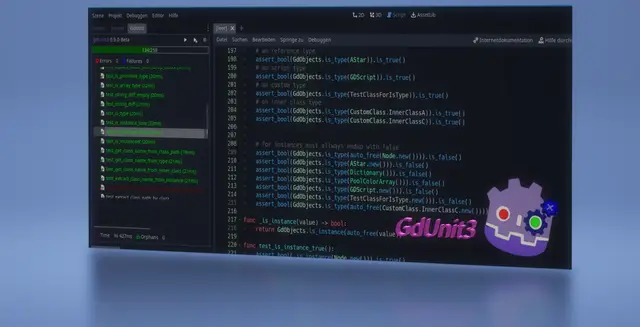
GdUnit3 is a framework for testing Gd-Scrips/C# and Scenes within the Godot editor. https://mikeschulze.github.io/gdUnit3/Features- Write and run tests in GdScript and full C# testing support- Embedded test Inspector in the Godot to navigate over your test suites- Run test-suite(s) by using the context menu on FileSystem, ScriptEditor or GdUnit Inspector- Create test’s directly from the ScriptEditor- A Configurable template for the creation of a new test-suite- A spacious set of Asserts use to verify your code- Argument matchers to verify the behavior of a function call by a specified argument type.- Fluent syntax support- Test Fuzzing support- Parameterized Tests (Test Cases)- Mocking a class to simulate the implementation which you define the output of certain function- Spy on a instance to verify that a function has been called with certain parameters.- Mock or Spy on a Scene- Provides a scene runner to simulate interactions on a scene - Simulate by Input events like mouse and/or keyboard - Simulate scene processing by a certain number of frames - Simulate scene proccessing by waiting for a specific signal - Simulate scene proccessing by waiting for a specific function result- Update Notifier to install latest version from GitHub- Command Line Tool- Visual Studio Code support by (GdUnit Test Explorer) extension- You are welcome to test in and send me your feedback- You are welcome to suggest improvements- You are welcome to report bugs

GF Framework icon image
C76GN
GF Framework

# GF FrameworkGF Framework is a lightweight architecture framework for Godot 4. It helps larger projects keep gameplay code organized without taking over Godot's scene tree.It separates:- data and state in `GFModel`- gameplay rules in `GFSystem`- scene, UI, input, and presentation bridges in `GFController`- lifecycle-managed runtime services in `GFUtility`- pure algorithms and data helpers in `standard/foundation`- optional atomic gameplay extensions in `addons/gf/extensions`## Highlights- Managed lifecycle through the `Gf` AutoLoad and project installers.- Events, commands, queries, typed accessors, bindable properties, and lifecycle-safe module lookup.- Editor workspace for extension management, script templates, diagnostics, export filtering, and project tooling.- New projects start with only the kernel and standard library active; bundled optional extensions are disabled by default and must be explicitly enabled.- Standard utilities for storage, settings, audio, input, assets, diagnostics, UI routing, time, logging, and runtime inspection.- Foundation helpers for graphs, grids, pathfinding, hex grids, layer masks, tags, validation reports, formulas, timelines, variant data, and formatting.- Optional extensions for capabilities, action queues, save graphs, flow graphs, network snapshots, turn flow, interaction, feedback, camera, dialogue, combat, domain models, and physics helpers.- GUT-tested maintenance suite and generated API reference.## BoundariesGF does not define your gameplay rules. It does not replace Godot physics, rendering, animation, UI design, or scene composition. Use it when you want stable architecture seams and reusable tools while keeping project-specific decisions in your own code.## InstallInstall the official Store package `gf-framework-6.0.0.zip`. It contains the full `addons/gf` addon folder: kernel, standard library, editor tooling, package manager, and bundled optional extensions. Optional extensions remain disabled until the project explicitly enables them, so the full package is the recommended first-install path.Copy `addons/gf` into your Godot project, enable `GF Framework` in `Project > Project Settings > Plugins`, then call `await Gf.init()` from your boot scene or use a project installer.Advanced modular installs are available from the GitHub Release. Download `gf-kernel-6.0.0.zip` only when you intentionally want a minimal bootstrap and will install additional packages through `GF Package Manager`, the Godot-native package CLI, a release registry, or an offline bundle. The minimal kernel package is not the recommended Store download for first-time users.Documentation: https://gf-framework.readthedocs.io/Source: https://github.com/C76GN/gf-frameworkLicense: Apache-2.0

Assets we Love

Explore more from Categories

Featured Categories

Newly Updated

Reactive UI Editor icon image
yanivkalfa
Reactive UI Editor

A full .guitkx editor inside the Godot editor - the authoring companion for the Reactive UI (React for Godot) addon. Double-click a .guitkx in the FileSystem dock and edit it in a main-screen tab: theme-matched syntax highlighting with embedded GDScript colouring, live compiler diagnostics with gutter icons and a project-wide Problems panel, completion for tags, attributes, values, directives, hooks and events, hover docs, signal-aware signature help, Ctrl+Click go-to-definition, find references, project-wide rename, find/replace and project search, outline, bookmarks, multi-file sessions with full state restore, and the same formatter as the VS Code extension (guitkx.config.json honored, format-on-save available). Saving plays cleanly with the runtime watcher and Fast Refresh: save while the game runs and the live UI hot-reloads with hook state preserved. REQUIRES the Reactive UI (React for Godot) addon, 0.8.4 or newer: enable reactive_ui first, then reactive_ui_editor (Project Settings -> Plugins). The download BUNDLES the reactive_ui_analyzer GDExtension (Windows x86_64, Linux x86_64 and arm64, macOS universal) - embedded GDScript gets type-aware completion, hover, diagnostics, navigation, rename and signature help out of the box, no extra install. Editor-only tooling: exclude addons/reactive_ui_analyzer from game export presets. macOS: the bundled library is unsigned - its README has the one-line fix. Developed with AI assistance (Anthropic Claude) under human direction.

Breakpoint MCP icon image
jlivingston-Cipher
Breakpoint MCP

Breakpoint MCP exposes the live Godot editor — and, through an in-game runtime autoload, your running game — to an MCP (Model Context Protocol) host, so an AI assistant can drive Godot directly instead of guessing at your project from the outside.The addon runs a loopback-only TCP/JSON bridge on 127.0.0.1. Paired with its companion host (the "breakpoint-mcp" npm package, which your MCP client launches), it gives an assistant 242 tools across four capability planes:- Editor authoring: scene / node / resource CRUD, project settings, ClassDB introspection, and editor screenshots. Every mutation is wrapped in EditorUndoRedoManager, so anything the assistant changes is fully undoable.- In-game runtime bridge: inspect the live SceneTree, get/set properties, call methods, emit signals, inject input, and read Performance monitors while the game is running.- Language + debug: GDScript symbols, definitions, and completions via Godot's own Language Server, plus breakpoint debugging over the Debug Adapter Protocol.- Headless CLI: run and export projects.Requirements: Godot 4.2+ (4.4+ recommended — several editor tools use APIs added in 4.4; a few runtime-capture features use 4.5+). The host requires Node.js 18+. Works with any MCP-compatible client; developed and tested with Claude.Install: copy addons/breakpoint_mcp/ into your project (or install via the Asset Library), then enable it under Project > Project Settings > Plugins > Breakpoint MCP. On enable it listens on 127.0.0.1:9080. Point your MCP client at the breakpoint-mcp host — see the repository README for client setup.Security: the bridge binds to loopback only and handlers run on the editor main thread. Treat the port as a local trust boundary; do not expose it beyond 127.0.0.1.Open source under the MIT license. Full tool catalog, user guide, and configuration reference are in the repository.

About Godot Asset Library

Godot Asset Library is a free and Open Source asset library for the Godot Engine maintained by the Godot Asset Library community on GitHub. Explore assets created by the Godot Engine community, and kickstart your development with quality assets from Godot Asset Library

Open Source

Released under the AGPLv3 license

Plug and Play

Browse assets directly from Godot

Community Driven

Created by developers for developers